
If you’re reading this post, chances are you’ve already made up your mind as to whether you should advertise on Facebook. But in case you’re still on the fence, here are some reasons:
- Build brand awareness. Unlike Google Ads, which are all text, Facebook ads allow you to use images and video, which can support your branding. And while purchase intent is not as high on Facebook as on Google, imagery gives you the power to stand out in users’ feeds through emotional marketing.
- Cost-effective. Because Facebook ads offer such specific targeting, you can rest assured that you’re making the most of your ad budget.
- Versatility. Between the wide range of ad formats and the different objectives available, you can use Facebook ads to target users at every stage of your marketing funnel.
- Gain audience insights. People spend a lot of time on Facebook and use it for a number of reasons in their day-to-day lives. The data you collect through Facebook ads provides invaluable customer insights you can use to inform your strategy elsewhere.
And if that’s not enough, here are some numbers for ya:
- Nearly 90% of businesses use Facebook advertising.
- The average Facebook user clicks on 11 ads per month.
- Facebook ads have the lowest average cost per click of all social media advertising platforms.
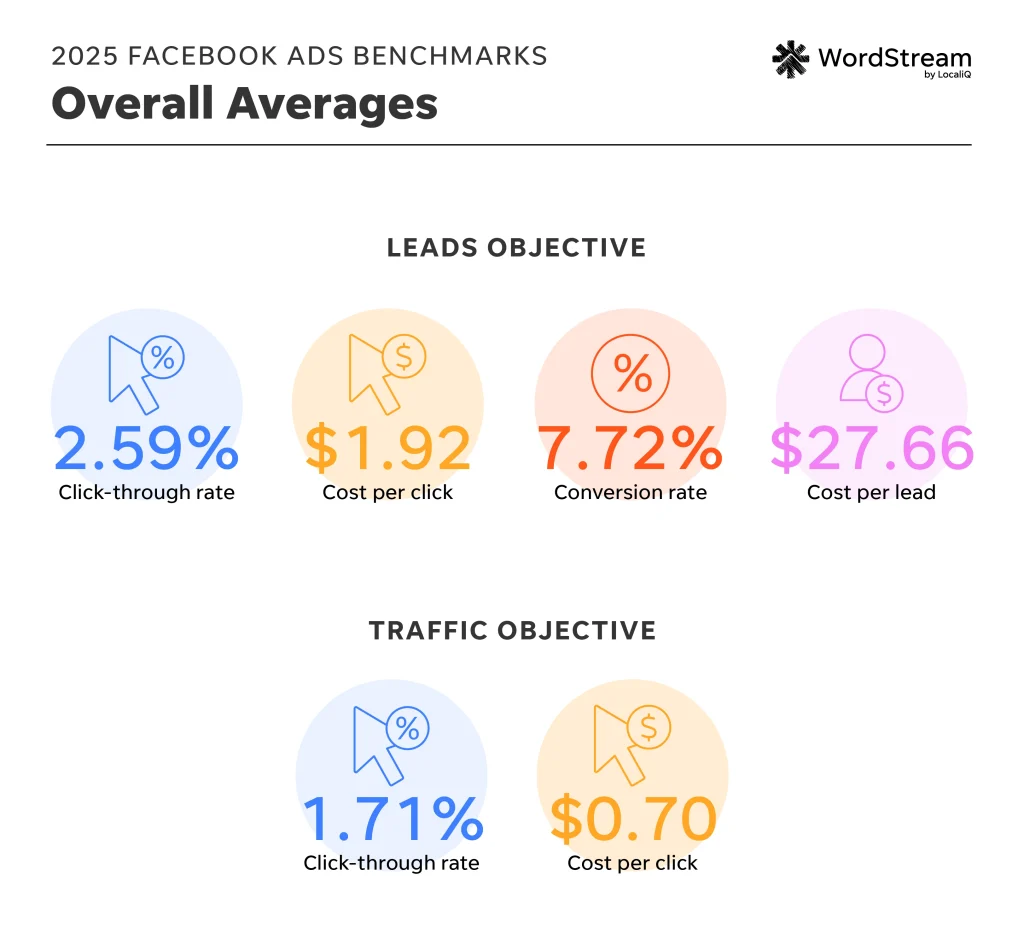
- The average CPC in Facebook ads is $1.92 for lead campaigns and $0.70 for traffic campaigns. That’s significantly lower than the overall average CPC in Google and Microsoft Ads, which is $5.42, making advertising on Meta the perfect strategy to complement your search campaigns.
Facebook ad account overview
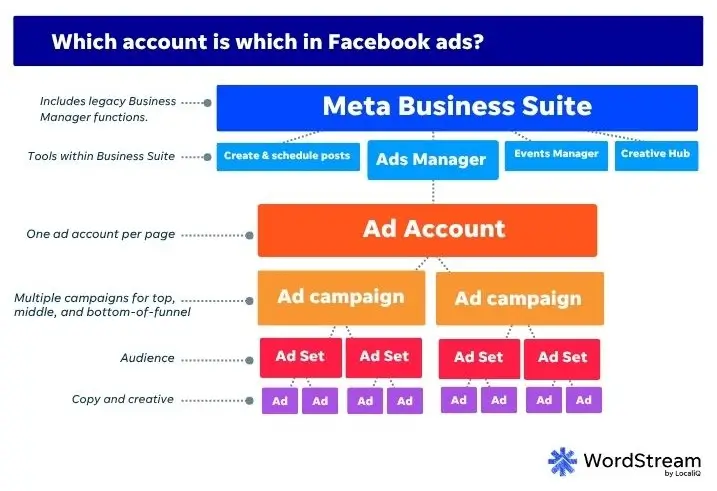
When you run Google Ads, you set up a Google Ads account and then off you go, but with the Meta Business Suite, there are several different properties involved. If you’re new to Facebook advertising or Meta Business Suite in general, you’re highly susceptible to falling into a black hole of confusion surrounding which accounts you need.
Here’s the breakdown (and don’t worry, I’m going to walk you through setting up all of these):
- Meta Business Suite (formerly Facebook Business Suite) is the umbrella account that encompasses everything. It’s a free account where you can manage your Facebook and Instagram pages in one place. You can create and schedule posts, reply to messages, get insights and notifications, and more.
- Business Manager is now one and the same as Business Suite. It used to be the backend where you manage permissions, payments, pixels, and more things that don’t begin with a P. All of these functions are now part of Meta Business Suite, but if you really want to perform them outside of the old Business Manager interface, you can click the help button and select Switch to Business Manager.
- Ads Manager. This is where your ad account(s) live. If you’re an agency, you will have multiple ad accounts in one Ads Manager account. If you’re the only one managing your properties, you don’t need a Meta Business Suites/Business Manager account to use Ads Manager, but it is recommended (and it’s free, so it can’t hurt).
- Ad account. This is what you create within Ads Manager. You should only have one ad account per business (or per Facebook business Page)
- Facebook Page. You need a Facebook Page in order to advertise on Facebook, but you don’t need to be advertising on Facebook in order to create a Page. In fact, this is a staple in any organic social media marketing strategy. You can create a page entirely separate from all of the above, right from your Facebook profile. Or you can create one out of Business Suite.
- Ad campaign. This is where you choose an objective. You can (and should) have multiple campaign types within one ad account.
- Ad set. This is where you determine your ad budget/bidding, schedule, and audience targeting, such as by demographics, interests, age, and more. You can have multiple ad sets in one campaign.
- Ad. This is your actual copy and creative. You’ll want to have at least two ads per ad set. We’ll talk more about Facebook ad account structure later on.